
Build Your First LLM App: Text Summarizer and Explainer with Python and OpenAI
Introduction
Before you build agents that use tools, remember conversations, or talk to other agents, it helps to start with the simplest possible thing an LLM app can do: take some text in, send it to a model with clear instructions, and return a useful result.
In this tutorial, we build a Text Summarizer and Explainer, a terminal application that takes any block of text and processes it in one of three ways: a short summary, a plain language explanation, or a bulleted list of key points. Every request is logged to a local JSON file with token counts, cost, and the time taken.
This is intentionally the simplest project in the series. There is no memory, no tools, and no multi step reasoning. Just one prompt in, one response out. Once this pattern is clear, everything else (agents, memory, multi agent teams) is really just this same pattern repeated and combined.

What We’re Building
Feature | Detail |
Summarize mode | Produces a shorter summary, automatically scaled to the input length |
Simplify mode | Explains the text in plain language for a non expert reader |
Bullets mode | Extracts the key points as a bulleted list |
Word aware summaries | Counts words in the input and targets a summary about half that length |
Request logging | Every request is saved to history.json with tokens, cost, and time |
Markdown rendering | Results are rendered with Rich Markdown in the terminal |
Tech Stack
Component | Tool |
AI Model | GPT-4o-mini |
API Client | openai Python SDK |
Terminal UI | rich |
Env Management | python-dotenv |
Request Logging | JSON file (history.json) |
Project Structure
text_summarizer/
├── summarizer.py     # Summarizer class — builds the prompt, calls OpenAI, tracks cost
├── main.py           # Terminal entry point — input loop, mode selection, history logging
├── history.json      # Auto-created — one record per request
├── requirements.txt  # openai, python-dotenv, rich
└── .env              # API key, model, and pricing rates
Setting Up
1. Install Dependencies
pip install openai python-dotenv rich2. Configure Environment
Create a .env file in the project folder:
# Your OpenAI API key, get yours at https://platform.openai.com/api-keys
OPENAI_API_KEY=your_openai_api_key_here

# Model used for the summarizer (default: gpt-4o-mini)
MODEL=gpt-4o-mini

# GPT-4o-mini pricing per 1M tokens, update here if OpenAI changes rates
INPUT_COST_PER_1M=0.150
OUTPUT_COST_PER_1M=0.600
Pricing is read from .env rather than hardcoded so you can update rates or switch models without touching the source code.
Building the Summarizer: summarizer.py
The Summarizer class has one job: take a piece of text and a mode, build the right prompt, call OpenAI, and return the result along with token and cost stats.
Imports and Pricing
import os                      # reads environment variables after load_dotenv()
from openai import OpenAI      # synchronous OpenAI client — a single request/response, no streaming needed
from dotenv import load_dotenv # reads .env and injects values into os.environ

load_dotenv()  # must be called before any os.getenv() — injects .env values into the process environment

_PRICING = {
    "input":  float(os.getenv("INPUT_COST_PER_1M",  "0.150")),  # cost per 1M input tokens — read from .env so no code change needed when rates change
    "output": float(os.getenv("OUTPUT_COST_PER_1M", "0.600")),  # cost per 1M output tokens — float() converts the env string to a number
}
Mode Prompts
Each mode has its own system prompt. This is the entire “intelligence” of the app: different instructions produce completely different outputs from the same input text.
_MODE_PROMPTS = {
    "summarize": (
        "You are a professional summarizer. Read the given text and write a summary that is "  # sets the persona for this mode
        "approximately {target_words} words long. "  # placeholder filled in at runtime based on input length
        "Focus on the main ideas and overall conclusion rather than restating every detail or example."  # forces real compression, not 1:1 rephrasing
    ),
    "simplify": (
        "You are an expert at explaining things simply. Read the given text and explain it "  # sets the persona for this mode
        "in plain, simple language, as if explaining it to someone with no background in the topic."  # targets a non expert reader
    ),
    "bullets": (
        "You are a professional summarizer. Read the given text and extract the key points "  # sets the persona for this mode
        "as a concise bulleted list, using '-' for each point."  # forces a consistent, easy to parse output format
    ),
}
The {target_words} placeholder in the summarize prompt is not filled in here. It gets filled in at runtime inside run(), based on the actual length of the input text.
Call Metadata
_CALL_METADATA = {
    "dev_name":    "Ganesh",      # identifies who made the API call — visible in the OpenAI dashboard
    "project":     "codex-test",  # project label for grouping API calls
    "environment": "local",       # marks calls as local development, not production
    "purpose":     "testing",     # intent label for usage log reviews
}
The Summarizer Class
class Summarizer:  # owns the OpenAI client and turns (text, mode) pairs into results
    """A simple LLM app that summarizes, simplifies, or bullet-points any text."""

    def __init__(self):  # runs once when main.py creates the single shared instance
        self.client = OpenAI(api_key=os.getenv("OPENAI_API_KEY", ""))  # synchronous client — one request per call, no need for async
        self.model  = os.getenv("MODEL", "gpt-4o-mini")                # model read from .env — defaults to gpt-4o-mini if not set
The run() Method
    def run(self, text: str, mode: str) -> dict:  # called once per request from main.py's input loop
        """Send the text to the model under the chosen mode and return the result with cost stats."""
        system_prompt = _MODE_PROMPTS[mode]  # pick the instructions for the selected mode

        if mode == "summarize":
            word_count    = len(text.split())               # number of words in the input text
            target_words  = max(1, word_count // 2)         # target the summary at half the input length — max(1, ...) avoids a target of 0 for very short input
            system_prompt = system_prompt.format(target_words=target_words)  # fill in the {target_words} placeholder

        response = self.client.chat.completions.create(
            model=self.model,      # model from .env
            messages=[
                {"role": "system", "content": system_prompt},  # mode specific instructions, possibly with target_words filled in
                {"role": "user",   "content": text},           # the raw text the user pasted
            ],
            max_tokens=500,           # enough for a summary, explanation, or bullet list of typical input sizes
            metadata=_CALL_METADATA,  # attached for dashboard tracking — does not affect model output
        )

        result = response.choices[0].message.content or ""  # the model's text output — or "" guards against a None content field

        prompt_tokens     = response.usage.prompt_tokens      # tokens used by the system prompt + the input text
        completion_tokens = response.usage.completion_tokens  # tokens used by the generated result

        input_cost  = round((prompt_tokens     / 1_000_000) * _PRICING["input"],  6)  # cost of the input tokens in USD
        output_cost = round((completion_tokens / 1_000_000) * _PRICING["output"], 6)  # cost of the output tokens in USD

        return {
            "result":            result,                              # the summary, explanation, or bullet list
            "mode":              mode,                                 # which mode produced this result
            "prompt_tokens":     prompt_tokens,                       # input tokens for this request
            "completion_tokens": completion_tokens,                   # output tokens for this request
            "total_tokens":      prompt_tokens + completion_tokens,   # combined total
            "input_cost":        input_cost,                          # input cost in USD
            "output_cost":       output_cost,                         # output cost in USD
            "total_cost":        round(input_cost + output_cost, 6),  # total cost in USD
        }
The key idea is the dynamic prompt for summarize mode. Instead of asking for a fixed number of sentences (which works poorly for both very short and very long input), the code measures the input with len(text.split()) and asks the model for a summary about half that length. A 400 word article gets a roughly 200 word summary; a 40 word paragraph gets a roughly 20 word summary.
Building the Terminal App: main.py
The entry point handles the input loop, mode selection, display, and request logging.
Imports and Setup
import json                    # serialises each request's data to history.json
import time                     # measures elapsed time per request
from datetime import datetime   # generates the timestamp for each history entry
from pathlib import Path        # builds the path to history.json next to main.py

from rich.console import Console   # renders coloured text and rules in the terminal
from rich.panel import Panel       # renders the result in a bordered box
from rich.markdown import Markdown # renders the result as formatted Markdown

from summarizer import Summarizer  # the class that builds prompts and calls OpenAI

console = Console()   # single Console instance shared across all display functions
tool    = Summarizer()  # single Summarizer instance reused for every request

HISTORY_FILE = Path(__file__).parent / "history.json"  # history.json sits next to main.py

MODES = {
    "1": "summarize",  # maps the number the user types to the mode name
    "2": "simplify",
    "3": "bullets",
}

MODE_LABELS = {
    "summarize": "Summary",            # panel title shown for summarize mode
    "simplify":  "Simple Explanation", # panel title shown for simplify mode
    "bullets":   "Key Points",         # panel title shown for bullets mode
}
Saving History
def save_history(text: str, result: dict, elapsed: float) -> None:  # called once per request after a successful run
    history = []
    if HISTORY_FILE.exists():                                   # load existing records, if any
        try:
            history = json.loads(HISTORY_FILE.read_text(encoding="utf-8"))  # parse the existing JSON array
        except json.JSONDecodeError:
            history = []                                         # if the file is empty or corrupted, start fresh rather than crashing
    history.append({
        "timestamp": datetime.now().isoformat(),  # when this request completed
        "text":      text,                        # the original input text
        "result":    result,                      # the full result dict — output, mode, tokens, and cost
        "time_taken_seconds": elapsed,            # wall-clock time for the API call
    })
    HISTORY_FILE.write_text(json.dumps(history, indent=2, ensure_ascii=False), encoding="utf-8")  # indent=2 keeps the file human-readable; ensure_ascii=False preserves unicode
Every request appends one record to the same history.json file. Tokens, cost, and time are saved here but never printed to the terminal, keeping the on screen experience clean while still giving you a full record to review later.
Header and Help
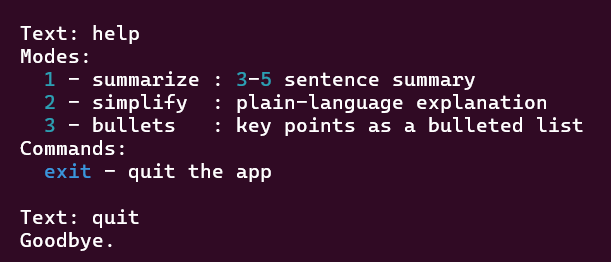
print_header() runs once at startup. print_help() runs only when the user types help, so the mode and command list stays out of the way until someone actually asks for it.
def print_header() -> None:  # shown once at startup
    console.print()
    console.rule("[bold]AI Text Summarizer & Explainer[/bold]")  # horizontal rule with the app title
    console.print()


def print_help() -> None:  # triggered by the "help" command
    console.print("  [bold]Modes:[/bold]")
    console.print("    [cyan]1[/cyan] - summarize : 3-5 sentence summary")     # describes mode 1
    console.print("    [cyan]2[/cyan] - simplify  : plain-language explanation")  # describes mode 2
    console.print("    [cyan]3[/cyan] - bullets   : key points as a bulleted list")  # describes mode 3
    console.print("  [bold]Commands:[/bold]")
    console.print("    [cyan]help[/cyan] - show this help message")
    console.print("    [cyan]exit[/cyan] - quit the app\n")
Choosing a Mode
After the user enters text, choose_mode() asks which of the three modes to apply. It keeps asking until the user enters 1, 2, 3, or exit/quit, so an invalid entry never crashes the app or silently picks a default mode.
def choose_mode() -> str | None:  # prompts the user to pick a mode after they enter text
    while True:
        choice = console.input("  Mode [1=Summarize, 2=Simplify, 3=Bullets]: ").strip()  # read the raw choice
        if choice.lower() in ("exit", "quit"):
            return None                              # signal the caller to exit cleanly
        if choice in MODES:
            return MODES[choice]                     # valid choice — return the mode name
        console.print("  [red]Invalid choice. Enter 1, 2, or 3.[/red]")  # invalid input — loop and ask again
The Input Loop
run() is the heart of the app. It prints the header, then loops forever: read the text, handle exit/quit/help as commands, ask which mode to use, send the text and mode to tool.run(), and display the result in a panel. Any error during the API call is caught and shown without crashing the loop, so one bad request does not end the session.
def run() -> None:  # the program's entry point — called once at the bottom of the file
    print_header()
    console.print("  Paste or type the text you want to process, then press Enter.")
    console.print("  Type [bold]help[/bold] for modes, or [bold]exit[/bold] to quit.\n")

    while True:   # the main input loop — runs until "exit", "quit", or Ctrl+C
        try:
            text = console.input("  Text: ").strip()   # .strip() removes accidental leading/trailing whitespace
        except (KeyboardInterrupt, EOFError):
            console.print("\n  Goodbye.")
            break

        if not text:
            continue   # ignore empty input — loop back to the prompt

        cmd = text.lower()

        if cmd in ("exit", "quit"):
            console.print("  Goodbye.")
            break

        if cmd == "help":          # show the mode and command list
            print_help()
            continue                # back to the prompt — not sent to the model

        console.print()             # blank line for spacing before the mode prompt
        mode = choose_mode()
        if mode is None:
            console.print("  Goodbye.")
            break

        console.print()                              # blank line for spacing before "Thinking..."
        console.print("  [dim]Thinking...[/dim]")    # shown immediately so the user sees activity during the API call

        try:
            start   = time.time()
            result  = tool.run(text, mode)            # sends the text to the model under the chosen mode
            elapsed = round(time.time() - start, 2)  # wall-clock time for this request
        except Exception as exc:
            console.print(f"  [red]Error: {exc}[/red]\n")
            continue   # on error, skip the display and loop back to the prompt

        console.print()                                      # blank line for spacing before the result panel
        console.print(Panel(
            Markdown(result["result"]),                        # render the result as Markdown — handles bold, lists, paragraphs
            title=f"[bold green]{MODE_LABELS[mode]}[/bold green]",  # panel title depends on the mode
            border_style="green",                              # green border highlights the result
            padding=(1, 2),                                    # 1 line vertical padding, 2 chars horizontal
        ))

        console.print()   # blank line for spacing before the next prompt

        save_history(text, result, elapsed)   # log this request to history.json


if __name__ == "__main__":   # only runs when executed directly with `python main.py`, not on import
    run()
Running the App
python main.py
The terminal displays:


Every request appends one record to history.json:
[
  {
    "timestamp": "2026-06-15T15:33:25.093151",
    "text": "The history of artificial intelligence dates back to the 1950s, when researchers first began exploring whether machines could simulate human thinking. Early AI systems relied on hardcoded rules and symbolic logic, but progress was slow due to limited computing power. In the 1990s and 2000s, machine learning emerged as a more practical approach, allowing systems to learn patterns from data rather than relying on fixed rules. The 2010s saw a major breakthrough with deep learning, powered by neural networks and large datasets, leading to dramatic improvements in image recognition, speech processing, and natural language understanding. Today, large language models like GPT can generate human-like text, answer questions, and assist with complex tasks across many industries.",
    "result": {
      "result": "The history of artificial intelligence (AI) began in the 1950s with efforts to simulate human thinking using hardcoded rules and symbolic logic, which progressed slowly due to limited computing power. The development of machine learning in the 1990s and 2000s enabled systems to learn from data, moving beyond fixed rules. Breakthroughs in the 2010s with deep learning and neural networks led to significant advancements in image recognition, speech processing, and natural language understanding. Currently, large language models like GPT are capable of generating human-like text and assisting with complex tasks across various industries.",
      "mode": "summarize",
      "prompt_tokens": 184,
      "completion_tokens": 120,
      "total_tokens": 304,
      "input_cost": 2.8e-05,
      "output_cost": 7.2e-05,
      "total_cost": 0.0001
    },
    "time_taken_seconds": 7.43
  },
  {
    "timestamp": "2026-06-15T15:33:43.050439",
    "text": "Photosynthesis is the biochemical process by which chlorophyll-containing organisms convert light energy, typically from the sun, into chemical energy stored in glucose molecules. This process occurs in the chloroplasts of plant cells and involves two main stages: the light-dependent reactions, which take place in the thylakoid membranes, and the light-independent reactions (Calvin cycle), which occur in the stroma. Water molecules are split during the light reactions, releasing oxygen as a byproduct, while carbon dioxide is fixed into organic compounds during the Calvin cycle.",
    "result": {
      "result": "Photosynthesis is how plants make their own food using sunlight. It happens inside special parts of the plant cells called chloroplasts. There are two main steps in this process:\n\n1. **Light-dependent reactions**: This first step uses sunlight to split water into oxygen and energy. The oxygen is released into the air, which is good for us to breathe.\n\n2. **Light-independent reactions (Calvin cycle)**: In the second step, the plant takes in carbon dioxide from the air and combines it with energy from the first step to make a sugar called glucose. This sugar is what the plant uses for energy and to grow.\n\nIn short, plants take sunlight, water, and carbon dioxide, and turn them into food (sugar) and oxygen.",
      "mode": "simplify",
      "prompt_tokens": 154,
      "completion_tokens": 152,
      "total_tokens": 306,
      "input_cost": 2.3e-05,
      "output_cost": 9.1e-05,
      "total_cost": 0.000114
    },
    "time_taken_seconds": 2.96
  },
  {
    "timestamp": "2026-06-15T15:39:50.637618",
    "text": "In today's meeting, the team discussed the upcoming product launch scheduled for next month. Marketing will begin the campaign two weeks before launch, focusing on social media and email outreach. The development team confirmed that all critical bugs have been fixed, but a few minor UI issues remain and will be addressed before the release. The support team requested additional training materials to handle expected customer inquiries. Finally, the budget for the launch event was approved, with a final review scheduled for next Friday.",
    "result": {
      "result": "- Upcoming product launch scheduled for next month.\n- Marketing campaign to start two weeks prior, focusing on social media and email outreach.\n- Development team confirmed all critical bugs are fixed; minor UI issues remain to be addressed before release.\n- Support team requested additional training materials for customer inquiries.\n- Budget for the launch event approved; final review scheduled for next Friday.",
      "mode": "bullets",
      "prompt_tokens": 134,
      "completion_tokens": 72,
      "total_tokens": 206,
      "input_cost": 2e-05,
      "output_cost": 4.3e-05,
      "total_cost": 6.3e-05
    },
    "time_taken_seconds": 2.04
  }
]
Nothing here is shown in the terminal. The on screen experience stays focused on the result, while this file gives you a complete log for reviewing usage, debugging, or analysing cost over time.
Who Can Benefit
Students taking their very first step into working with the OpenAI API
Developers who want a minimal, no-framework reference for a single prompt and response
Writers and editors who need quick summaries or simplified explanations of long text
Teams that want to understand exactly how prompt design changes the output, with no other moving parts
Anyone evaluating whether GPT-4o-mini is good enough for a given summarization task before scaling up
How Codersarts Can Help
A project like this is the foundation for much larger systems: document summarization pipelines, content moderation tools, customer feedback analysis, and more. If you want to take a simple prompt and response pattern and turn it into a production tool, Codersarts provides end-to-end development and mentorship.
Custom AI application development, from simple LLM tools to full agent systems
One-on-one mentorship and code reviews
Project-based learning with real-world applications
Get in touch: codersarts.com | contact@codersarts.com
Continue Your AI Learning Journey with Codersarts
If you enjoyed this article and would like to discover more about modern AI applications, production-ready LLM systems, and real-world RAG and MCP implementations, be sure to explore these other blogs from Codersarts:
Build a Cost-Efficient Writing Quality Checker with Tiered Model Routing and OpenAI
Build Your First A2A Agent: An Email Drafting Pipeline Using Python and OpenAI
Building an AI Interview Prep Agent with Qwen 3.7 Max and Streamlit
https://www.codersarts.com/post/building-an-ai-interview-prep-agent-with-qwen-3-7-max-and-streamlit
Building an AI Book Recommender with Kimi K2 and Streamlit
https://www.codersarts.com/post/building-an-ai-book-recommender-with-kimi-k2-and-streamlit



Comments