
Build a Real-Time News Research Agent with GLM-5-Turbo
Introduction
Most browser-automation agent tutorials demo a narrow, single-purpose task and stop there, the agent finds one type of result on one type of site, and the tutorial never has to confront what happens when the page it’s scraping changes shape, or when the search engine itself starts treating the request as a bot.
In this tutorial we build a real-time news research agent using GLM-5-Turbo, a tool-calling model from Z.AI, paired with a real Playwright-driven Chromium browser and a Streamlit UI. You give it a topic, and it searches the web, opens the most promising pages, reads them, and writes a sourced briefing, key findings, caveats, and the actual articles it checked, grounded in pages it genuinely visited rather than its own training data.

What We Are Building
A Streamlit app backed by a tool-calling agent loop. The workflow:
Ask for a research topic, a recency preference, and how many articles to read
Search the web for the topic
Open the most promising results and read their actual content with a real browser
Extract article candidates, headline, byline, publish date, heuristically from page text
Write a final JSON briefing: a summary, key findings, caveats, and the sources actually checked
Render that briefing as markdown plus a sortable table in the browser
Tech Stack
Component | Tool |
Model | GLM-5-Turbo, via Z.AI or OpenRouter |
Browser automation | Playwright (sync API), real Chromium |
UI | Streamlit |
HTTP | requests, no provider-specific SDK |
Pricing ane Free Options
Every other recently built project in this series either runs free and local, or uses gpt-4o-mini, OpenAI’s cheapest model. This one is different: GLM-5-Turbo via OpenRouter is priced at $1.20 per million input tokens and $4.00 per million output tokens, confirmed directly from OpenRouter’s own pricing page, closer to GPT-4-class pricing than to gpt-4o-mini. There is no free tier for GLM-5-Turbo. Every browsing step the agent takes, a search, opening a page, extracting content, is its own real, billed model call, so a single research run can easily involve five or more paid requests before it produces a final answer.
If you want to try this without spending anything first, OpenRouter hosts several genuinely free models that support tool-calling. nvidia/nemotron-3-nano-omni-30b-a3b-reasoning:free is a reasonable starting point: it is free on OpenRouter’s current free tier, it supports tool-calling, and its reasoning-focused design makes it more reliable than smaller free alternatives at following complex multi-step agent instructions. Change LLM_MODEL in .env to use it. Free models on OpenRouter have lower rate limits and may be less consistent at strict tool-calling than a paid model, so expect occasional unexpected behavior, but the overall architecture works the same regardless of which model fills the role.
Project Structure
glm_news_research_agent/
├── src/
│   ├── model_gateway.py    # ModelGateway: talks to GLM-5-Turbo via Z.AI or OpenRouter
│   ├── web_actions.py      # WebActions: Playwright-driven browser actions, including article extraction
│   ├── research_agent.py   # ResearchAgent: the tool-calling loop, instructions, and tool schemas
│   └── dashboard.py        # Streamlit UI: research form, live step log, final briefing and table
├── requirements.txt        # streamlit, playwright, requests, pydantic, python-dotenv, pandas
└── .env                    # LLM_PROVIDER, LLM_MODEL, ZAI_API_KEY, OPENROUTER_API_KEY, HEADLESS, MAX_STEPS
Setting Up
You’ll need a real API key from either Z.AI or OpenRouter, since GLM-5-Turbo is not available for free on either platform.
Create a file named requirements.txt in the project root:
streamlit>=1.43.0
playwright>=1.52.0
requests>=2.32.0
pydantic>=2.10.0
python-dotenv>=1.0.1
pandas>=2.2.3
Playwright needs a real browser binary installed separately, pip install alone only gets you the Python driver, not Chromium itself. After installing dependencies, also run playwright install chromium.
Create a file named .env in the project root:
LLM_PROVIDER=zai
LLM_MODEL=glm-5-turbo
ZAI_API_KEY=your_zai_api_key_here
OPENROUTER_API_KEY=your_openrouter_api_key_here
HEADLESS=true
MAX_STEPS=10
Set LLM_PROVIDER to openrouter instead if that’s the key you actually have. MAX_STEPS caps how many tool-calling turns the agent gets before it’s forced to give up and return whatever it has, a real safety limit against an agent that never converges, covered again in the agent loop section below.
Building the Model Gateway
Here’s what we’re about to build: a thin client that talks to GLM-5-Turbo through either of two providers, Z.AI directly or OpenRouter, since both happen to expose an OpenAI-shaped chat completions endpoint. Create a file named model_gateway.py inside a src folder.
from __future__ import annotations

import json                              # parse tool-call argument strings out of the raw response
import os                                # read provider base-URL overrides from the environment
from dataclasses import dataclass        # lightweight typed records for a tool call and a model turn
from typing import Any, Dict, List, Optional  # type hints used throughout this module

import requests                          # plain HTTP, no provider-specific SDK needed for either backend


@dataclass
class ToolInvocation:                    # one tool call the model asked for, parsed out of the raw response
    id: str                              # the unique call id the model assigned, echoed back in the tool result
    name: str                            # which tool the model asked to run, e.g. "run_web_search"
    arguments: Dict[str, Any]            # the parsed kwargs to pass to that tool


@dataclass
class ModelTurn:                         # everything one model response produced: text plus any tool calls
    content: str                         # the model's final text, non-empty only when it stops calling tools
    tool_calls: List[ToolInvocation]     # zero or more tool calls requested this turn
    raw: Dict[str, Any]                  # the full, unmodified API response, kept for debugging
ToolInvocation and ModelTurn exist so the rest of the codebase never has to dig through raw API response dictionaries directly, every other file works with these two small, typed records instead.
Now let’s write the class that actually builds the request and talks to whichever provider is configured.
class ModelGateway:
    # Talks to GLM-5-Turbo through either Z.AI's own API or OpenRouter's, since both expose an
    # OpenAI-shaped chat completions endpoint and the only real differences are the base URL and
    # a couple of OpenRouter-specific headers it expects for attribution.
    def __init__(
        self,
        provider: str,
        api_key: str,
        model: str,
        app_name: str = "GLM-5 News Research Agent",
        app_url: str = "http://localhost:8501",
    ) -> None:
        self.provider = provider.lower().strip()  # "zai" or "openrouter", decides URL and headers below
        self.api_key = api_key                    # the real, paid credential for whichever provider
        self.model = model                        # e.g. "glm-5-turbo" or a free OpenRouter model id
        self.app_name = app_name                  # sent to OpenRouter for attribution, ignored by Z.AI
        self.app_url = app_url                    # same, OpenRouter-only

        if self.provider == "zai":
            self.url = os.environ.get("ZAI_BASE_URL", "https://api.z.ai/api/paas/v4/chat/completions")  # Z.AI endpoint
        elif self.provider == "openrouter":
            self.url = os.environ.get("OPENROUTER_BASE_URL", "https://openrouter.ai/api/v1/chat/completions")  # OpenRouter
        else:
            raise ValueError("provider must be 'zai' or 'openrouter'")
The constructor decides the base URL once, at construction time, based on which provider was selected, so every later call to request_completion never has to branch on provider for the URL itself, only for the small header and payload differences shown next.
    def request_completion(
        self,
        messages: List[Dict[str, Any]],
        tools: Optional[List[Dict[str, Any]]] = None,
        temperature: float = 0.2,
        max_tokens: int = 4000,          # large enough for the final JSON briefing, which can be verbose
        enable_thinking: bool = False,
        response_format: Optional[Dict[str, Any]] = None,
    ) -> ModelTurn:
        headers = {
            "Authorization": f"Bearer {self.api_key}",   # both providers use a plain bearer token
            "Content-Type": "application/json",           # JSON request body
        }
        if self.provider == "openrouter":
            headers["HTTP-Referer"] = self.app_url       # OpenRouter requires these two for attribution
            headers["X-Title"] = self.app_name

        payload: Dict[str, Any] = {
            "model": self.model,                          # tells the provider which model to route to
            "messages": messages,                         # the full conversation history this turn
            "temperature": temperature,                   # low by default, keeps agent decisions consistent
            "max_tokens": max_tokens,                     # caps the response length; hit this and content is truncated
            "stream": False,                              # the agent loop needs the full turn, not chunks
        }

        if tools:
            payload["tools"] = tools                      # the list of tool schemas the model can call
            payload["tool_choice"] = "auto"              # let the model decide whether to call a tool

        if response_format:
            payload["response_format"] = response_format  # e.g. {"type": "json_object"} for guaranteed JSON
        if self.provider == "zai":
            payload["thinking"] = {"type": "enabled" if enable_thinking else "disabled"}  # Z.AI-only knob

        response = requests.post(self.url, headers=headers, json=payload, timeout=180)  # real inference is slow
        response.raise_for_status()                        # surfaces 4xx/5xx immediately, no silent failures
        data = response.json()                             # the full API response as a Python dict
        return self._parse_model_response(data)            # turn that dict into the typed ModelTurn the rest uses
enable_thinking and the "thinking" payload field are Z.AI-specific, OpenRouter ignores anything outside the standard schema, so this is gated to only apply when provider == "zai". tool_choice: "auto" is what actually allows the model to decide for itself whether a given turn needs a tool call or not, the agent loop below depends entirely on that decision being made correctly.
Finally, the part that turns a raw API response into the typed ModelTurn the rest of the code actually works with.
    def _parse_model_response(self, data: Dict[str, Any]) -> ModelTurn:
        choices = data.get("choices") or []                # OpenAI shape: top-level "choices" list
        if not choices:
            raise RuntimeError(f"No choices returned. Raw response: {json.dumps(data)[:1200]}")

        message = choices[0].get("message", {})            # the assistant message from the first (and only) choice
        content = message.get("content") or ""             # the model's text output, empty when it only calls tools
        raw_tool_calls = message.get("tool_calls") or []   # list of tool calls, empty when the model gives a text answer
        tool_calls: List[ToolInvocation] = []              # will be populated below

        for idx, tc in enumerate(raw_tool_calls):           # OpenAI-style tool_calls array
            fn = tc.get("function", {})                    # each entry has a "function" sub-object with name + arguments
            args_raw = fn.get("arguments") or "{}"         # arguments are JSON-encoded as a string, not a dict
            try:
                args = json.loads(args_raw) if isinstance(args_raw, str) else args_raw  # decode into a real dict
            except json.JSONDecodeError:
                args = {"_raw": args_raw}                    # keep the malformed payload visible, not silently dropped
            tool_calls.append(
                ToolInvocation(
                    id=tc.get("id", f"tool_call_{idx}"),   # id is required for the matching tool result message
                    name=fn.get("name", "unknown_tool"),    # which tool to dispatch, matches keys in the dispatcher
                    arguments=args,                         # the decoded kwargs to pass to that tool
                )
            )
        if not tool_calls and message.get("function_call"):  # legacy single function_call shape, fallback path
            fc = message["function_call"]
            args_raw = fc.get("arguments") or "{}"
            try:
                args = json.loads(args_raw) if isinstance(args_raw, str) else args_raw
            except json.JSONDecodeError:
                args = {"_raw": args_raw}
            tool_calls.append(ToolInvocation(id="function_call_0", name=fc.get("name", "unknown_tool"), arguments=args))

        return ModelTurn(content=content, tool_calls=tool_calls, raw=data)  # typed record the agent loop works with
Tool call arguments arrive from the API as a JSON-encoded string, not a parsed object, so this is where that gets decoded back into a real dictionary. If decoding fails, the malformed string is kept under _raw rather than silently discarded, so a broken tool call is still visible in the trace instead of vanishing.
Building the Browser Actions
Next, the part that actually controls a browser. Every method here is a tool the model can ask to run; none of them know anything about GLM-5-Turbo, they just perform one browser action and return a plain dictionary. Create a file named web_actions.py, also inside src.
from __future__ import annotations

import re                                # heuristic extraction: bylines, dates, headline candidates
import time                              # unused directly, kept for parity with explicit wait_for_timeout calls
import xml.etree.ElementTree as ET       # parse Google News RSS feed, no extra dependency needed
from typing import Any, Dict, List
from urllib.parse import quote_plus      # URL-encode the search query for Google News RSS

import requests                          # plain HTTP for the search and RSS steps
from playwright.sync_api import TimeoutError as PlaywrightTimeoutError  # caught specifically in wait_for_visible_text
from playwright.sync_api import sync_playwright  # drives a real, visible-or-headless Chromium instance


class WebActions:
    # Owns one real browser context for the whole agent run. Every method here is a tool the model
    # can invoke; none of them know anything about GLM-5-Turbo or the agent loop, they just do one
    # browser action and return a plain dict the model can read back.
    def __init__(self, headless: bool = True) -> None:
        self.playwright = sync_playwright().start()            # launch the Playwright control process
        self.browser = self.playwright.chromium.launch(headless=headless)  # open a real Chromium browser
        self.context = self.browser.new_context(viewport={"width": 1440, "height": 1100})  # standard desktop size
        self.page = self.context.new_page()                    # one persistent page reused for every navigation
        self.current_links: List[Dict[str, str]] = []          # most recent search results or page links, for open_result_at_index

    def close(self) -> None:
        try:
            self.context.close()                               # release page and cookies
            self.browser.close()                               # shut down the Chromium process
            self.playwright.stop()                             # stop the Playwright control process
        except Exception:
            pass                                               # best-effort cleanup, never let teardown crash the app
One WebActions instance owns one real browser for the entire agent run, opened once in init and torn down once in close, rather than spinning up a fresh browser per action, which would be both slow and would lose any navigation state between steps.
Now the search step, which is the part actually responsible for finding pages to read in the first place.
    def run_web_search(self, query: str, max_results: int = 8) -> Dict[str, Any]:
        # Google News RSS returns real, current news articles with no API key and no anti-bot blocking.
        # DuckDuckGo's HTML endpoint was the original approach but consistently returns empty results
        # due to CAPTCHA challenges on both plain HTTP and Playwright-browser requests.
        rss_url = f"https://news.google.com/rss/search?q={quote_plus(query)}&hl=en-US&gl=US&ceid=US:en"  # standard news search RSS
        headers = {"User-Agent": "Mozilla/5.0"}               # minimal but non-empty user-agent to avoid 403s
        resp = requests.get(rss_url, headers=headers, timeout=30)  # plain HTTP, no browser needed for an RSS feed
        resp.raise_for_status()                                # raise immediately on 4xx/5xx, don't return empty silently
        try:
            root = ET.fromstring(resp.content)                 # parse RSS XML; ET handles the XML declaration cleanly
        except ET.ParseError:
            return {"query": query, "results": [], "error": "RSS parse failed"}

        results = []
        for item in root.findall(".//item"):                   # each <item> is one news article entry in the feed
            title_el = item.find("title")                      # <title> contains the article headline
            link_el = item.find("link")                        # <link> is the article URL (may be a Google redirect)
            pub_el = item.find("pubDate")                      # <pubDate> is the RFC-822 publish timestamp
            title = title_el.text.strip() if title_el is not None and title_el.text else ""
            url = link_el.text.strip() if link_el is not None and link_el.text else ""
            pub = pub_el.text.strip() if pub_el is not None and pub_el.text else ""  # empty string if missing
            if title and url:                                  # skip malformed entries that are missing either
                results.append({"title": title, "url": url, "published": pub})
            if len(results) >= max_results:                    # stop early once we have enough, don't parse the rest
                break

        self.current_links = results                           # so open_result_at_index can reference these by index
        return {"query": query, "results": results}
The next several methods are the agent’s hands: opening pages, clicking, typing, and waiting.
    def load_page(self, url: str) -> Dict[str, Any]:
        self.page.goto(url, wait_until="domcontentloaded", timeout=45000)  # don't wait for all network activity, just the DOM
        self.page.wait_for_timeout(1200)                       # short settle time for client-rendered content to appear
        return self._capture_snapshot()                        # return title, url, and first 5000 chars of page text

    def open_result_at_index(self, index: int) -> Dict[str, Any]:
        if index < 0 or index >= len(self.current_links):
            return {"error": f"index {index} out of range", "available": len(self.current_links)}  # model asked for something out of bounds
        target = self.current_links[index]                     # pick the matching entry from the last search or extract
        return self.load_page(target["url"])                   # navigate and return a snapshot

    def click_element(self, selector: str) -> Dict[str, Any]:
        try:
            self.page.locator(selector).first.click(timeout=15000)  # .first avoids "found multiple" errors
            self.page.wait_for_timeout(1200)                   # settle after the click before snapshotting
            return self._capture_snapshot()
        except Exception as exc:
            return {"error": f"click_element failed: {exc}", **self._fallback_state()}  # tell the model, don't crash

    def fill_text(self, selector: str, text: str, press_enter: bool = False) -> Dict[str, Any]:
        try:
            locator = self.page.locator(selector).first        # .first avoids "found multiple" errors on repeated elements
            locator.fill(text, timeout=15000)                  # fill clears the field first, then types the new value
            if press_enter:
                locator.press("Enter")                         # submit the form without needing a separate click
                self.page.wait_for_timeout(1500)               # slightly longer settle after a form submit
            return self._capture_snapshot()
        except Exception as exc:
            return {"error": f"fill_text failed: {exc}", **self._fallback_state()}

    def wait_for_visible_text(self, text: str, timeout_ms: int = 15000) -> Dict[str, Any]:
        try:
            self.page.get_by_text(text).first.wait_for(timeout=timeout_ms)  # blocks until text appears in the DOM
            return self._capture_snapshot()
        except PlaywrightTimeoutError:
            return {"error": f"Timed out waiting for text: {text}", **self._fallback_state()}  # page never showed the text
Every one of these returns a dictionary, an error message or a fresh page snapshot, rather than raising an exception up through the agent loop. A failed click is information the model can act on, try a different selector, move on, not a crash that kills the whole research run.
This next method is the general-purpose reader: extract whatever text and links are on the current page, with no assumption about what kind of page it is.
    def extract_page_content(self, max_chars: int = 7000, link_limit: int = 20) -> Dict[str, Any]:
        snapshot = self._capture_snapshot(max_chars=max_chars)     # title, url, and full visible text
        snapshot["links"] = self._gather_links(limit=link_limit)   # clickable links on the current page
        self.current_links = snapshot["links"]                     # lets a later open_result_at_index reuse these too
        return snapshot
And this is the domain-specific reader, the one redesigned entirely for this project: instead of recognizing a flight listing by its price and departure time, it recognizes a news article by its byline and publish date.
    def extract_article_summaries(self, max_articles: int = 12) -> Dict[str, Any]:
        # Heuristic, regex-based extraction over plain visible text, the same window-scanning
        # approach the original flight-card extractor used, redesigned around what identifies a
        # news article (a byline, a publish date) instead of what identifies a flight (a price, a time).
        text = self.page.locator("body").inner_text(timeout=10000)  # rendered visible text, no HTML tags
        lines = [ln.strip() for ln in text.splitlines() if ln.strip()]  # discard blank lines
        byline_pattern = re.compile(r"\bBy\s+[A-Z][a-zA-Z.'-]+(?:\s+[A-Z][a-zA-Z.'-]+){0,3}\b")  # "By First Last"
        date_pattern = re.compile(
            r"\b(?:Jan|Feb|Mar|Apr|May|Jun|Jul|Aug|Sep|Oct|Nov|Dec)[a-z]*\.?\s+\d{1,2},?\s+\d{4}\b"  # Jun 15, 2026
            r"|\b\d{4}-\d{2}-\d{2}\b"                         # ISO 8601: 2026-06-15
            r"|\b\d{1,2}\s+(?:hours?|days?|minutes?|weeks?)\s+ago\b",  # relative: "2 days ago"
            re.IGNORECASE,
        )
        articles: List[Dict[str, Any]] = []
        window_size = 8                                         # scan 8 consecutive lines at a time as one candidate block
        for i in range(len(lines)):
            window = lines[i : i + window_size]
            joined = " | ".join(window)                        # join the window into one string for regex scanning
            date_match = date_pattern.search(joined)
            if not date_match:
                continue                                        # no date in this window, unlikely to be an article block
            byline_match = byline_pattern.search(joined)       # optional; not every article shows a byline in plain text
            headline_candidate = window[0]                     # the first line of the window is treated as the headline
            if len(headline_candidate) < 15:
                continue                                        # too short to plausibly be a real headline

            article = {
                "headline": headline_candidate[:200],          # truncated to keep the model's context manageable
                "byline": byline_match.group(0) if byline_match else None,  # None if no "By Author" pattern found
                "published": date_match.group(0),              # the matched date string, exactly as it appears
                "snippet": joined[:350],                       # raw text excerpt for the model to read directly
            }
            if article not in articles:                        # deduplicate: the same block can match from multiple starting lines
                articles.append(article)
            if len(articles) >= max_articles:
                break

        return {
            "url": self.page.url,                              # the URL this extraction ran against
            "title": self.page.title(),                        # the page's own <title> tag
            "articles": articles,                              # the heuristic-extracted article candidates
            "raw_excerpt": text[:5000],                        # lets the model fall back to raw text if heuristics miss
        }
The date_pattern alone is doing most of the real work here, it accepts three different common date phrasings, a written month and day, an ISO date, or a relative “2 days ago” style timestamp, since real news sites are inconsistent about which one they use.
A window of consecutive lines is treated as a plausible article block only if a date appears somewhere in it; the line right before that window becomes the assumed headline.
Finally, the three small private helpers every public method above leans on.
    def _capture_snapshot(self, max_chars: int = 5000) -> Dict[str, Any]:
        title = self.page.title()                              # the page's <title>, useful for the model to orient itself
        url = self.page.url                                    # the current URL, after any redirects
        text = self.page.locator("body").inner_text(timeout=15000)  # all visible text, no HTML markup
        return {
            "title": title,
            "url": url,
            "text": text[:max_chars],                          # capped to avoid sending a huge article verbatim to the model
        }

    def _gather_links(self, limit: int = 20) -> List[Dict[str, str]]:
        links: List[Dict[str, str]] = []
        try:
            anchors = self.page.locator("a")                   # every <a> element on the current page
            count = min(anchors.count(), limit)                # cap to avoid iterating hundreds of navigation links
            for i in range(count):
                a = anchors.nth(i)                             # access by zero-based index
                text = a.inner_text(timeout=5000).strip()      # the visible link text
                href = a.get_attribute("href", timeout=5000)   # the href attribute value
                if href and text:                              # skip anchors with no href or no visible text
                    links.append({"text": text[:120], "url": href})  # text truncated to keep payload small
        except Exception:
            pass                                               # a single bad anchor shouldn't fail the whole extraction
        return links

    def _fallback_state(self) -> Dict[str, Any]:
        try:
            return {"title": self.page.title(), "url": self.page.url}  # basic state for error context
        except Exception:
            return {"title": "", "url": ""}                    # the page itself may be gone if the browser crashed
gatherlinks deliberately swallows exceptions from any single anchor tag rather than letting one malformed link kill the entire extraction, real pages have plenty of anchors with missing or strange attributes.
Building the Research Agent
With the model gateway and the browser actions both in place, the next step ties them together: the instructions that tell the model how to behave, the schema describing every tool it can call, and the loop that actually drives the conversation forward. Create a file named research_agent.py, also inside src.
from __future__ import annotations

import json                              # serialize tool-call arguments and tool results back to the model
from typing import Any, Dict, Generator, List, Tuple  # type hints for events, messages, and the execute return type

from model_gateway import ModelGateway   # the class that talks to the LLM provider


AGENT_INSTRUCTIONS = """
You are a browser-based news research agent.

Your job:
- Turn the user's natural-language research question into a small number of smart browsing steps.
- Use tools to search, open pages, inspect page text, and extract article summaries.
- Prefer reliable, well-known news sources over unfamiliar or low-quality sites.
- Be conservative. Do not invent headlines, dates, or article details.
- Stop browsing once you have enough real articles to write an honest briefing.
- When you are done, return a concise JSON summary in plain text.

Important rules:
- Keep the number of steps low.
- Use run_web_search first unless the user already gave a URL.
- After opening a promising page, use extract_page_content or extract_article_summaries.
- If a page is noisy, paywalled, or blocked, move on.
- Final output must be valid JSON only (no markdown, no prose outside JSON) with keys:
  query_summary, key_findings, briefing, caveats, sources
""".strip()
The output schema, query_summary, key_findings, briefing, caveats, sources, replaces the original flight-research version’s best_options/recommendation pair, since a news briefing needs a list of findings and an explicit caveats field for disagreement between sources, not a single best pick.
Next, the full list of tools the model is allowed to call, each one matching a method on WebActions by name.
TOOL_SCHEMAS: List[Dict[str, Any]] = [
    {
        "type": "function",
        "function": {
            "name": "run_web_search",
            "description": "Search the public web for news articles and reporting on a topic.",
            "parameters": {
                "type": "object",
                "properties": {
                    "query": {"type": "string"},
                    "max_results": {"type": "integer", "default": 8},
                },
                "required": ["query"],
            },
        },
    },
    {
        "type": "function",
        "function": {
            "name": "load_page",
            "description": "Open a URL in the live browser.",
            "parameters": {
                "type": "object",
                "properties": {"url": {"type": "string"}},
                "required": ["url"],
            },
        },
    },
    {
        "type": "function",
        "function": {
            "name": "open_result_at_index",
            "description": "Open one of the most recent search results by zero-based index.",
            "parameters": {
                "type": "object",
                "properties": {"index": {"type": "integer"}},
                "required": ["index"],
            },
        },
    },
    {
        "type": "function",
        "function": {
            "name": "extract_page_content",
            "description": "Extract visible text and links from the current page.",
            "parameters": {
                "type": "object",
                "properties": {
                    "max_chars": {"type": "integer", "default": 7000},
                    "link_limit": {"type": "integer", "default": 20},
                },
            },
        },
    },
    {
        "type": "function",
        "function": {
            "name": "extract_article_summaries",
            "description": "Extract heuristic news article candidates (headline, byline, date) from the current page.",
            "parameters": {
                "type": "object",
                "properties": {
                    "max_articles": {"type": "integer", "default": 12},
                },
            },
        },
    },
    {
        "type": "function",
        "function": {
            "name": "click_element",
            "description": "Click an element on the current page using a CSS selector.",
            "parameters": {
                "type": "object",
                "properties": {"selector": {"type": "string"}},
                "required": ["selector"],
            },
        },
    },
    {
        "type": "function",
        "function": {
            "name": "fill_text",
            "description": "Type into a CSS-selected input box. Optionally press Enter.",
            "parameters": {
                "type": "object",
                "properties": {
                    "selector": {"type": "string"},
                    "text": {"type": "string"},
                    "press_enter": {"type": "boolean", "default": False},
                },
                "required": ["selector", "text"],
            },
        },
    },
    {
        "type": "function",
        "function": {
            "name": "wait_for_visible_text",
            "description": "Wait until text appears on the current page.",
            "parameters": {
                "type": "object",
                "properties": {
                    "text": {"type": "string"},
                    "timeout_ms": {"type": "integer", "default": 15000},
                },
                "required": ["text"],
            },
        },
    },
]
Every name field here has to match exactly what dashboard.py’s tool dispatcher checks for later, get one wrong and the model will successfully request a tool call that the dispatcher silently can’t route.
Finally, the loop itself: ask the model what to do, run whatever it asks for, feed the result back, repeat.
class ResearchAgent:
    # Ties a ModelGateway (the model calls) to a tool_runner (the actual browser actions) in a
    # plain tool-calling loop: ask the model what to do, run whatever tool it asked for, feed the
    # result back, repeat until it stops calling tools and returns a final answer or hits max_steps.
    def __init__(self, model: ModelGateway, tool_runner, max_steps: int = 10) -> None:
        self.model = model                                       # the LLM client, does the actual API calls
        self.tool_runner = tool_runner                           # callable(name, args) that dispatches to WebActions
        self.max_steps = max_steps                               # hard cap on turns before giving up

    def execute(self, user_query: str) -> Tuple[List[Dict[str, Any]], str]:
        events = list(self.stream_steps(user_query))             # collect every status/tool/final event in order
        final_text = ""
        for event in reversed(events):                           # scan backwards; the final event is usually last
            if event["type"] == "final":
                final_text = event["content"]
                break
        return events, final_text                                # both the full log and just the final text

    def stream_steps(self, user_query: str) -> Generator[Dict[str, Any], None, None]:
        messages: List[Dict[str, Any]] = [
            {"role": "system", "content": AGENT_INSTRUCTIONS},  # the agent's rules and output format
            {"role": "user", "content": user_query},             # the research question from the Streamlit form
        ]

        for step in range(1, self.max_steps + 1):
            yield {"type": "status", "step": step, "content": f"Model planning step {step}..."}  # live progress for the UI
            turn = self.model.request_completion(
                messages=messages,                               # the full conversation history up to this step
                tools=TOOL_SCHEMAS,                              # every tool the model is allowed to call
                temperature=0.2,                                 # low temperature keeps browsing decisions consistent
                max_tokens=4000,                                 # large enough for a verbose final JSON briefing
                enable_thinking=False,                           # Z.AI-specific flag, no effect on OpenRouter
            )

            messages.append(                                     # add the model's response to the conversation history
                {
                    "role": "assistant",
                    "content": turn.content,                     # empty when the model only made tool calls
                    "tool_calls": [
                        {
                            "id": tc.id,                         # must match the id echoed back in the tool result
                            "type": "function",
                            "function": {"name": tc.name, "arguments": json.dumps(tc.arguments)},  # re-serialised as string
                        }
                        for tc in turn.tool_calls
                    ]
                    if turn.tool_calls
                    else None,                                   # must be None (not empty list) when no tools were called
                }
            )

            if turn.tool_calls:
                for tc in turn.tool_calls:
                    yield {                                       # let the UI display the tool call immediately
                        "type": "tool_call",
                        "step": step,
                        "tool": tc.name,
                        "arguments": tc.arguments,
                    }
                    result = self.tool_runner(tc.name, tc.arguments)  # run the actual browser action
                    yield {                                       # let the UI display the tool result immediately
                        "type": "tool_result",
                        "step": step,
                        "tool": tc.name,
                        "result": result,
                    }
                    messages.append(
                        {
                            "role": "tool",                      # OpenAI's required role for tool result messages
                            "tool_call_id": tc.id,              # ties this result to the call that requested it
                            "content": json.dumps(result, ensure_ascii=False),  # the browser action's dict as a JSON string
                        }
                    )
                continue                                          # more tool calls pending, loop without yielding final

            final_content = turn.content.strip()
            if final_content:                                    # model returned text with no tool calls: that's the answer
                yield {"type": "final", "step": step, "content": final_content}
                return

        yield {                                                   # ran out of steps without a final answer
            "type": "final",
            "step": self.max_steps,
            "content": json.dumps(
                {
                    "query_summary": user_query,
                    "key_findings": [],
                    "briefing": "Agent hit the step limit before producing a final answer.",
                    "caveats": ["Increase MAX_STEPS or narrow the research question."],
                    "sources": [],
                },
                indent=2,
            ),
        }
stream_steps is a generator rather than a function that just returns a final string, every status update, tool call, and tool result is yielded as its own event, which is exactly what lets the Streamlit UI show live progress instead of a blank screen until the whole run finishes. The fallback at the bottom matters in practice: without it, an agent that never converges on a final answer would just silently run out of steps and return nothing, instead of an honest, structured admission that it hit the limit.
Building the Dashboard
The last piece is the part a person actually sees: a Streamlit form, a live log of what the agent is doing, and a rendered briefing once it’s done. Create a file named dashboard.py, also inside src.
from __future__ import annotations

import json                              # parse the agent's final JSON briefing
import os                                # read provider/model/credential config from the environment
from contextlib import contextmanager    # guarantees the browser closes even if the agent run raises
from typing import Any, Dict             # type hints for briefing dicts and tool dispatcher args
from urllib.parse import urlparse        # validate and inspect source links before rendering them

import pandas as pd                      # builds the findings table shown in the UI
import streamlit as st                   # the entire visual layer: form widgets, containers, dataframe display
from dotenv import load_dotenv           # reads .env into os.environ before any config is read

from research_agent import ResearchAgent  # the tool-calling loop
from web_actions import WebActions        # the Playwright browser actions
from model_gateway import ModelGateway    # the LLM API client

load_dotenv()                             # must run before the os.environ.get() calls below

st.set_page_config(page_title="GLM-5 News Research Agent", page_icon="📰", layout="wide")
st.title("📰 GLM-5-Turbo Real-Time News Research Agent")


@contextmanager
def browser_session(headless: bool):
    browser = WebActions(headless=headless)  # open one Chromium instance for the whole agent run
    try:
        yield browser                          # pass it to the with-block body
    finally:
        browser.close()                        # always tear down, even on an exception mid-run
browser_session is a context manager specifically so that a crash partway through an agent run still closes the real browser process behind it, an uncaught exception in the middle of a multi-step research run should not leave a zombie Chromium process running.
Next, the dispatcher that connects a tool name the model asked for to the actual WebActions method that performs it.
def build_tool_dispatcher(browser: WebActions):
    # Maps the exact tool names the model can call (TOOL_SCHEMAS in research_agent.py) to the
    # matching WebActions method. The agent loop never touches WebActions directly, only through this.
    def run(name: str, args: Dict[str, Any]):
        if name == "run_web_search":
            return browser.run_web_search(**args)       # Google News RSS search
        if name == "load_page":
            return browser.load_page(**args)            # navigate to a URL in the real browser
        if name == "open_result_at_index":
            return browser.open_result_at_index(**args) # navigate to a search result by position
        if name == "extract_page_content":
            return browser.extract_page_content(**args) # read visible text and links from current page
        if name == "extract_article_summaries":
            return browser.extract_article_summaries(**args)  # heuristic article extraction
        if name == "click_element":
            return browser.click_element(**args)        # click a CSS-selected element
        if name == "fill_text":
            return browser.fill_text(**args)            # type into a CSS-selected input
        if name == "wait_for_visible_text":
            return browser.wait_for_visible_text(**args)  # block until text appears
        return {"error": f"Unknown tool: {name}"}       # any name not listed here is an error

    return run                                           # return the inner function as the dispatcher
This is the one place that has to stay in sync with TOOL_SCHEMAS in research_agent.py, every name defined there needs a matching branch here, or the model can successfully request a tool that silently does nothing but return an “Unknown tool” error.
The model’s final answer is supposed to be clean JSON, but is not always exactly that, so the next function exists purely to recover it anyway.
def parse_agent_output(text: str) -> Dict[str, Any] | None:
    try:
        return json.loads(text)                          # the common case: a clean JSON string
    except Exception:
        pass                                             # not valid JSON as-is, try the fallbacks below

    # Recover JSON from fenced blocks or extra wrapper text the model sometimes adds anyway.
    stripped = text.strip()                              # remove any surrounding whitespace first
    if stripped.startswith("```"):                       # model wrapped its answer in a code fence
        lines = stripped.splitlines()
        if len(lines) >= 3 and lines[0].startswith("```") and lines[-1].startswith("```"):
            candidate = "\n".join(lines[1:-1]).strip()  # everything between the opening and closing fence
            if candidate.lower().startswith("json"):
                candidate = candidate[4:].strip()        # strip the "json" language tag if present
            try:
                return json.loads(candidate)             # second attempt: the content inside the fence
            except Exception:
                pass                                     # still not valid, fall through to the last resort

    start = stripped.find("{")                           # find the first opening brace in the text
    end = stripped.rfind("}")                            # find the last closing brace in the text
    if start != -1 and end != -1 and end > start:
        try:
            return json.loads(stripped[start : end + 1])  # third attempt: grab everything between braces
        except Exception:
            return None                                  # even the brace-extraction failed, give up

    return None                                          # no JSON could be recovered in any of the three ways
Three fallback attempts, in order: parse it as-is, strip a markdown code fence if the model wrapped its JSON in one anyway despite being told not to, then fall back to just grabbing everything between the first { and the last }. Returning None rather than raising means the UI can always show something, the raw text, even when none of the three attempts succeed.
Before rendering, two small helpers normalize the model’s output, since the model is not always perfectly consistent about whether it returns a list or a single string, or whether it includes raw Google redirect URLs in its source list.
def _as_list(value) -> list:
    # The model sometimes returns a single string instead of a list.
    # Iterating over a string character by character produces the letter-by-letter bug.
    if isinstance(value, list):
        return value                                     # already a list, nothing to do
    if isinstance(value, str) and value:
        return [value]                                   # wrap the bare string in a one-element list
    return []                                            # None or empty string: start with an empty list


def _filter_sources(sources: list) -> list:
    # Drop raw Google News redirect URLs (news.google.com/rss/articles/...) since they
    # are internal redirect links, not the real article URLs the reader would want to visit.
    return [s for s in sources if "news.google.com/rss/articles" not in str(s)]
aslist exists because when caveats is a plain string and for caveat in caveats iterates over it, each character becomes its own bullet: - I, - m, - p, - l… making the rendered output unreadable. filtersources exists because Google News RSS sometimes returns its own redirect URLs (news.google.com/rss/articles/CBMi...) rather than the final article URL, and those internal redirect links are not useful to display as sources.
Now the functions that turn a parsed briefing into readable output.
def render_briefing_markdown(parsed: Dict[str, Any]) -> str:
    query_summary = parsed.get("query_summary", "Research question not available.")  # what was asked
    briefing = parsed.get("briefing", "No briefing available.")                       # the narrative summary
    key_findings = _as_list(parsed.get("key_findings") or [])                        # normalised to list
    caveats = _as_list(parsed.get("caveats") or [])                                  # normalised to list
    sources = _filter_sources(_as_list(parsed.get("sources") or []))                 # cleaned source list

    md = "## Briefing\n\n"                               # top-level summary heading
    md += f"{briefing}\n\n"                              # the narrative text the model wrote
    md += f"**Question researched:** {query_summary}\n\n"  # what was actually asked for context

    if key_findings:
        md += "## Key findings\n\n"
        for finding in key_findings:
            md += f"- {finding}\n"                       # one bullet per finding, string or dict repr
        md += "\n"                                       # blank line before the next section

    if caveats:
        md += "## Caveats\n\n"
        for caveat in caveats:
            md += f"- {caveat}\n"                        # one bullet per caveat
        md += "\n"

    if sources:
        md += "## Sources checked\n\n"
        for source in sources:
            md += f"- {source}\n"                        # one bullet per source URL or citation

    return md                                            # caller passes this to st.markdown


def clean_url(value: Any) -> str:
    if not value:
        return ""                                         # None, empty string, or zero — nothing to validate
    url = str(value).strip()                             # convert whatever type arrived to a stripped string
    parsed = urlparse(url)
    if parsed.scheme in {"http", "https"} and parsed.netloc:
        return url                                       # valid absolute URL with a real hostname
    return ""                                            # anything that isn't a real http(s) URL is dropped


def first_nonempty(opt: Dict[str, Any], keys: list[str], default: str = "N/A") -> Any:
    for key in keys:                                     # try each key in priority order
        value = opt.get(key)                             # None if the key doesn't exist
        if value is not None and str(value).strip() != "":
            return value                                 # first non-empty value wins
    return default                                       # none of the keys had a usable value
clean_url exists because the model occasionally returns something that looks like a URL but isn’t one, a bare domain name, or placeholder text, and Streamlit’s LinkColumn would rather show nothing than a broken link. first_nonempty exists because the model is not perfectly consistent about which key name it uses for a given field across different runs, so several plausible key names get checked in order rather than assuming just one.
def build_findings_dataframe(parsed: Dict[str, Any]) -> pd.DataFrame:
    findings = _as_list(parsed.get("key_findings") or [])         # normalise to list regardless of model output shape
    sources = _filter_sources(_as_list(parsed.get("sources") or []))  # drop Google redirect URLs before using
    default_source = clean_url(sources[0]) if sources else ""      # fallback URL when a finding has no link of its own
    default_source_domain = urlparse(default_source).netloc if default_source else "N/A"  # e.g. "reuters.com"

    rows = []
    for i, item in enumerate(findings, 1):                         # enumerate from 1 for human-readable rank column
        if not isinstance(item, dict):
            # A plain string finding still gets a row, just without structured headline/source fields.
            rows.append({"Rank": i, "Headline": str(item), "Source": default_source_domain, "Published": "N/A", "Link": None})
            continue

        headline = first_nonempty(item, ["headline", "title"], default="N/A")   # model uses either key depending on the run
        published = first_nonempty(item, ["published", "date", "published_date"], default="N/A")  # same inconsistency for dates
        row_link = clean_url(item.get("link") or item.get("url") or item.get("source_url") or default_source)  # try several key names
        row_source = (                                              # also tries several key names, falls back to domain extraction
            item.get("source")
            or item.get("outlet")                                  # some models use "outlet" for the publication name
            or item.get("site")                                    # or "site"
            or (urlparse(row_link).netloc if row_link else "")     # if none of those exist, extract domain from the link
            or default_source_domain                               # last resort: the first source's domain
            or "N/A"
        )
        rows.append(
            {
                "Rank": item.get("rank", i),                       # model may assign its own rank; fall back to enumerate index
                "Headline": headline,
                "Source": row_source,
                "Published": published,
                "Link": row_link if row_link else None,            # None so Streamlit's LinkColumn skips it cleanly
            }
        )

    return pd.DataFrame(rows)                                      # empty DataFrame if no findings, checked by caller before display
This accepts key_findings whether the model returned a list of plain strings or a list of structured objects, since both are valid-looking ways to answer “what did you find,” and forcing only one shape would make the UI brittle against a model that answers correctly but slightly differently shaped than expected.
Finally, the actual page: reading configuration from the environment, the research form, and wiring a button click to a full agent run.
provider = os.environ.get("LLM_PROVIDER", "zai").strip().lower() or "zai"  # "zai" or "openrouter"
if provider not in {"zai", "openrouter"}:
    provider = "zai"                                              # silently fix an invalid value rather than crashing

model_name = os.environ.get("LLM_MODEL", "glm-5-turbo").strip() or "glm-5-turbo"  # the model id sent to the provider
api_key = os.environ.get("ZAI_API_KEY", "") if provider == "zai" else os.environ.get("OPENROUTER_API_KEY", "")  # pick the right key
headless = os.environ.get("HEADLESS", "true").lower() == "true"  # False shows the browser window, useful for debugging
max_steps = int(os.environ.get("MAX_STEPS", "10"))               # how many model turns before giving up

st.subheader("Research Request")                                  # section label above the form inputs
topic = st.text_input("Topic", value="AI regulation in the EU")  # what to research
recency = st.selectbox("Recency", ["past 24 hours", "past week", "past month", "any time"], index=1)  # folded into the query
depth = st.slider("How many articles to read", min_value=2, max_value=8, value=4)  # a soft target passed to the model
natural_request = st.text_area(
    "Optional natural language request",
    value="Summarize what's actually new, and flag anything the sources disagree on.",
    height=120,
)

user_query = (                                                    # the full prompt the agent receives
    f"Research recent news on: {topic}. Recency preference: {recency}. "
    f"Read at least {depth} distinct articles before concluding. "
    f"User preference: {natural_request}"
)

run = st.button("Run research agent", type="primary", use_container_width=True)  # triggers the agent run below

if run:
    if not api_key:
        st.error("Missing API key. Set ZAI_API_KEY or OPENROUTER_API_KEY in .env.")
        st.stop()                                                 # halt before trying to construct a gateway with no key

    model = ModelGateway(provider=provider, api_key=api_key, model=model_name)  # one client for the whole run

    event_box = st.container(border=True)                        # live step log renders here as events arrive
    result_box = st.container(border=True)                       # final briefing renders here after the run

    all_events = []                                              # every event, collected for final-answer extraction

    with browser_session(headless=headless) as browser:          # browser lives for exactly the duration of the agent run
        agent = ResearchAgent(model=model, tool_runner=build_tool_dispatcher(browser), max_steps=max_steps)

        for event in agent.stream_steps(user_query):             # generator yields one event per status/tool/final step
            all_events.append(event)                             # keep the full log for final-answer extraction later
            with event_box:                                      # render each event inside the live log container
                if event["type"] == "status":
                    st.write(f"**Step {event['step']}** — {event['content']}")  # show planning step number live
                elif event["type"] == "tool_call":
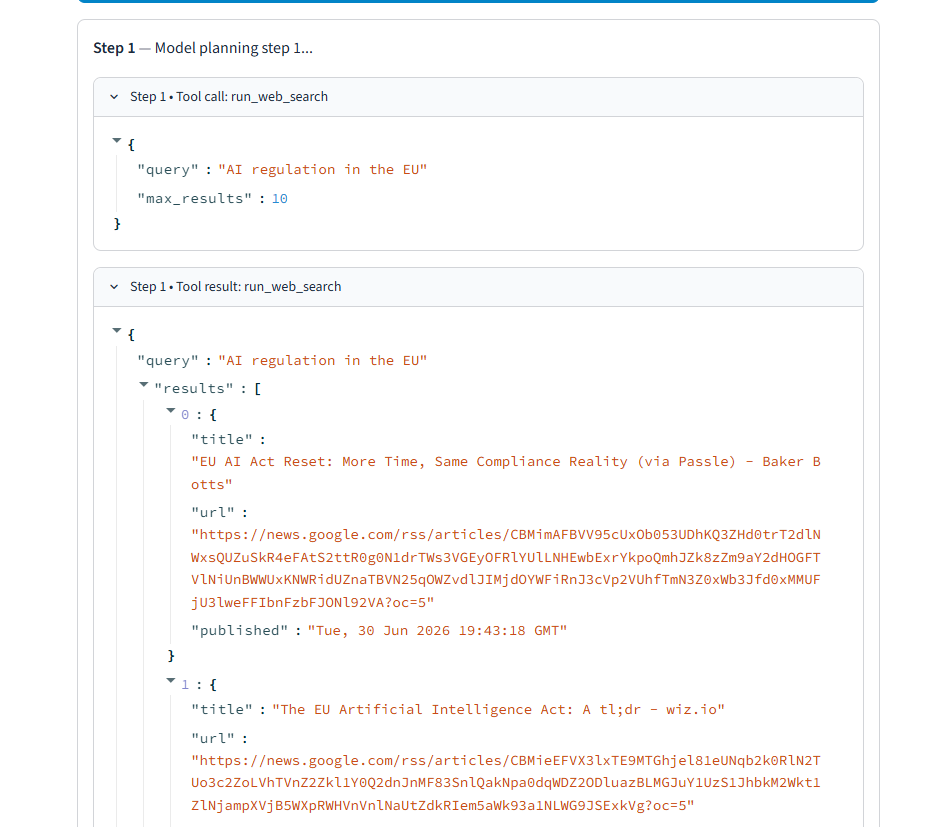
                    with st.expander(f"Step {event['step']} • Tool call: {event['tool']}", expanded=False):
                        st.json(event["arguments"])               # show what args the model sent
                elif event["type"] == "tool_result":
                    with st.expander(f"Step {event['step']} • Tool result: {event['tool']}", expanded=False):
                        st.json(event["result"])                  # show what the browser action returned
                elif event["type"] == "final":
                    st.success("Agent finished.")                 # confirmation banner once the run completes

    final_event = next((e for e in reversed(all_events) if e["type"] == "final"), None)  # find the last final event
    final_text = final_event["content"] if final_event else ""   # empty string if the agent produced nothing

    with result_box:                                             # switch to the result container for the rendered briefing
        st.subheader("Final Briefing")
        parsed = parse_agent_output(final_text)                  # attempt to recover a usable dict from the model's JSON
        if parsed:
            st.markdown(render_briefing_markdown(parsed))         # render the narrative briefing as markdown
            findings_df = build_findings_dataframe(parsed)        # build a structured table of the articles found
            if not findings_df.empty:
                st.subheader("Articles found")
                st.dataframe(
                    findings_df,
                    use_container_width=True,
                    column_config={
                        "Link": st.column_config.LinkColumn("Link", display_text="Open source"),  # make the link column clickable
                    },
                )
        else:
            st.markdown(final_text)                              # fallback: render the raw text if JSON parsing fully failed
The form’s natural-language request field is folded directly into user_query alongside the structured topic, recency, and depth fields, giving the model both a precise constraint and room to honor a free-form preference in the same request. Every event the agent loop yields gets rendered immediately inside event_box, so a slow, multi-step research run shows real progress instead of a frozen page until the very end.
Running It
Create the virtual environment, install dependencies, and install the actual browser binary:
python -m venv venv
venv\Scripts\activate
pip install -r requirements.txt
playwright install chromium
Then launch the app:
streamlit run src\dashboard.py
Enter a topic, pick a recency window, set how many articles to read, and click “Run research agent.” Each step streams into the page as it happens.
Output




Who Can Benefit
Students — Follow a real debugging journey from silently empty search results through two failed fixes to the approach that finally worked, and see what verifying code actually means versus just running it.
Developers — Get a complete, working pattern for calling GLM-5-Turbo’s tool-calling API through either Z.AI or OpenRouter, with real pricing, real failure modes, and no provider-specific SDK required.
Researchers and journalists — Adapt the news research agent to any domain that needs live, sourced information gathered from real pages rather than a pre-indexed corpus.
ML and platform engineers — Study the live event-streaming pattern that lets Streamlit display each agent step in real time without blocking the UI until a final result arrives.
Teams with web-scraping needs — See exactly how DuckDuckGo’s HTML search endpoint fails under automated traffic and why switching to Google News RSS was the correct fix, not a workaround.
How Codersarts Can Help
If you want to take this further, Codersarts offers hands-on support at every stage.
For learners: Live 1-to-1 sessions with an AI engineer who can walk through tool-calling agent loops, browser automation with Playwright, and debugging strategies for flaky, real-world web scraping in detail.
For teams: End-to-end development of browser-automation agent tooling, including resilient extraction logic, cost-aware tool-calling design, and reliability testing against real, live sites.
For enterprises: Architecture consulting for production research and data-gathering agents, including evaluating paid model providers and designing around anti-bot defenses on the open web.
Reach out at contact@codersarts.com or visit www.codersarts.com to get started.
Continue Your AI Learning Journey with Codersarts
If you enjoyed this article and would like to discover more about modern AI applications, production-ready LLM systems, and real-world RAG and MCP implementations, be sure to explore these other blogs from Codersarts:
Build a Cost-Efficient Writing Quality Checker with Tiered Model Routing and OpenAI
Build Your First A2A Agent: An Email Drafting Pipeline Using Python and OpenAI
Building an AI Interview Prep Agent with Qwen 3.7 Max and Streamlit
https://www.codersarts.com/post/building-an-ai-interview-prep-agent-with-qwen-3-7-max-and-streamlit
Academic Research Assistance and Literature Review Automation Using RAG
Clinical Decision Support Systems Using RAG: Intelligent Diagnostic Assistance for Healthcare
Financial Decision Making with RAG Powered Market Intelligence
https://www.codersarts.com/post/financial-decision-making-with-rag-powered-market-intelligence



Comments