
Tkinter Popup Boxes With Function Value

In this blog, we will learn how to pass function value with Tkinter "messagebox" or popup boxes, like showinfo(), showerror(), askquestion() etc.
Before going through it first we will learn all the popup window in Tkinter:
showinfo()
showwarning()
showerror ()
askquestion()
askokcancel()
askyesno ()
askretrycancel ()
Here the simple line of code to show, showinfo() popup window:
<!-----------------------------code------------------------------!>
#showinfo() popup window
import tkinter
from tkinter.messagebox import showinfo
top = tkinter.Tk()
def hello():
MsgBox = tkinter.messagebox.showinfo ('tk','hi')
B1 = tkinter.Button(top, text = "Say Hello", command = hello)
B1.pack()
top.mainloop()
<!-----------------------------code------------------------------!>
Output:

showwarning()
<!-------------------------code---------------------------------!>
#show warning
import tkinter
from tkinter.messagebox import showwarning
top = tkinter.Tk()
def hello():
MsgBox = tkinter.messagebox.showwarning('tk','hi')
B1 = tkinter.Button(top, text = "Say Hello", command = hello)
B1.pack()
top.mainloop()
<!-----------------------------code------------------------------!>
Output:

showerror ()
<!-------------------------code---------------------------------!>
import tkinter
from tkinter.messagebox import showerror
top = tkinter.Tk()
def hello():
MsgBox = tkinter.messagebox.showerror('tk','hi')
B1 = tkinter.Button(top, text = "Say Hello", command = hello)
B1.pack()
top.mainloop()
<!-----------------------------code------------------------------!>
Output:

askquestion()
<!-------------------------code---------------------------------!>
#askquestion() in tkinter
import tkinter
from tkinter.messagebox import askquestion
top = tkinter.Tk()
def hello():
MsgBox = tkinter.messagebox.askquestion('tk','hi')
B1 = tkinter.Button(top, text = "Say Hello", command = hello)
B1.pack()
top.mainloop()
<!-----------------------------code------------------------------!>
output:
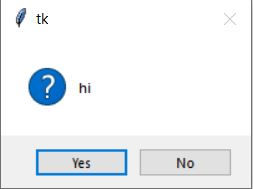
askokcancel()
<!-------------------------code---------------------------------!>
#askokcancel popup boxes
import tkinter
from tkinter.messagebox import askokcancel
top = tkinter.Tk()
def hello():
MsgBox = tkinter.messagebox.askokcancel('tk','hi')
B1 = tkinter.Button(top, text = "Say Hello", command = hello)
B1.pack()
top.mainloop()
<!-----------------------------code------------------------------!>
Output:

askyesno()
<!-----------------------------code------------------------------!>
#askyesno() in tkinter
import tkinter
from tkinter.messagebox import askyesno
top = tkinter.Tk()
def hello():
MsgBox = tkinter.messagebox.askyesno('tk','hi')
B1 = tkinter.Button(top, text = "Say Hello", command = hello)
B1.pack()
top.mainloop()
<!-----------------------------code------------------------------!>
Output:

askretrycancel ()
<!-----------------------------code------------------------------!>
#askyesno() in tkinter
import tkinter
from tkinter.messagebox import askyesno
top = tkinter.Tk()
def hello():
MsgBox = tkinter.messagebox.askyesno('tk','hi')
B1 = tkinter.Button(top, text = "Say Hello", command = hello)
B1.pack()
top.mainloop()
<!-----------------------------code------------------------------!>
Output:

Get your project or assignment completed by python Tkinter GUI expert and experienced developers and researchers.
OR
If you have project files, You can send at codersarts@gmail.com directly


Comments