
Docker commands you need to know
Updated: Feb 7, 2022

In my previous two blogs of docker, We have discussed what is docker, how they work and how to install them on ubuntu. If you are not acquainted with docker or if you want to know how to install docker you can check out these blog
Today, In this blog we will discuss some docker commands that will be used frequently while working with docker. Let's start.
Docker version
Before we learn the docker command, We will check the version of docker.
This command will show you the current version of docker.
command : Docker –version

Docker pull command
Docker pull command is used to pull images from the docker repository. When pull command runs on the command line, first it will check the image on the host or locally, if it does not exist then it will connect docker daemon to public registry ‘hub.docker.com’ if there is no private registry mentioned in the daemon.json file and pull the docker image mentioned in the command. If it is found locally it will check for the updates and download the new version of the image.
command : sudo docker pull ubuntu

Docker image
If you want to check the existing image which is present on your system you can use docker image command.
Command : sudo docker images

Docker run command
This command is used to create a container from images.
Command : sudo docker run -it -d ubuntu

Docker ps command
If you want to check the list of running containers then you can use this command. This command will show the complete list of running containers on you system.
Command : sudo docker ps

In the previous command we did not assign the name to the container. To assign the name of the container we can write commands like this.
Command : sudo docker run -it -d --name my_container ubuntu

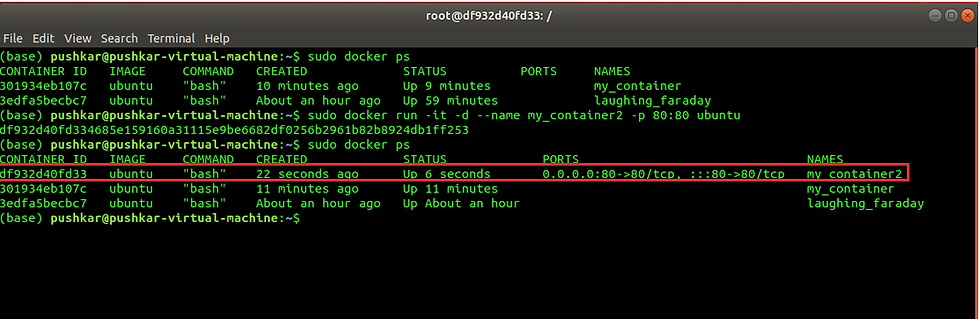
We can also add the port using the following command. This port number will help you to access the container through the host system.
Command : sudo docker run -it -d --name my_container2 -p 80:80 ubuntu
Docker exec
Docker exec -ti this command is used to access the running container.
Command : sudo docker exec -ti my_container2 bash

You have to just type "exit" to exit from the container.
Docker stop command
Docker stop command is used to stop the container from execution. You can also use container name instead to container _id.
Command : sudo docker stop "container_ID"

Docker Start command
This command is used to start the container. You can also use container name instead to container_id.
Command : sudo docker start "container_id"

Docker kill command
Docker kill command is used to kill the container from execution immediately. incase docker stop command takes too much time to stop the container, we can use docker kill command. docker stop command stop the container gracefully while docker kitt the command stop the container forcefully. docker stop leads to a safe exit while docker kill leads to an unsafe exit.
Command : sudo docker kill "container_id"

Docker restart command
This command is used to restart the container.
Command : sudo docker restart"container_id"

Docker commit command
Docker commit command is used to create a new image of an edited container locally.
Command : sudo docker commit "container_id" “new_image_name”

if you need any type of python or machine learning assignment help feel free to contact us


Comments