
App Works Locally but Not in Production? Fixes | Codersarts
You built something real. Maybe it took a weekend with Lovable, a few evenings with Cursor or an afternoon of prompting Claude Code. In the preview window everything works: the login, the dashboard, the button that calls an AI model and writes the perfect paragraph.
Then you deploy it, and nothing works. The page loads but the data does not. Login spins forever. The AI feature returns an error you have never seen. Or, more confusingly, it works for a day and then quietly breaks.
This is the oldest problem in software, usually summed up as "it works on my machine". AI coding tools have not removed it; they have made it more common, because more people are shipping apps without ever having deployed one before. This guide explains why it happens, how to find the cause, and how to stop it happening again.
Why "It Works on My Machine" Happens
Your laptop and a production server are two very different places. Locally, your app benefits from a lot of invisible help:
Settings stored in a hidden file on your computer
Software and tools you installed months ago and forgot about
Generous permissions, because you are the only user
One person using the app at a time
A disk that never disappears
Production removes all of that. The server starts from nothing except what you explicitly give it. It may restart at any moment. It may run several copies of your app at once. And it is exposed to the internet, with real users doing things you never tried.
AI coding tools are very good at writing code that works in the environment they can see. They are much less aware of the environment your app will eventually live in. That gap is where most deployment failures come from.
The Most Common Causes
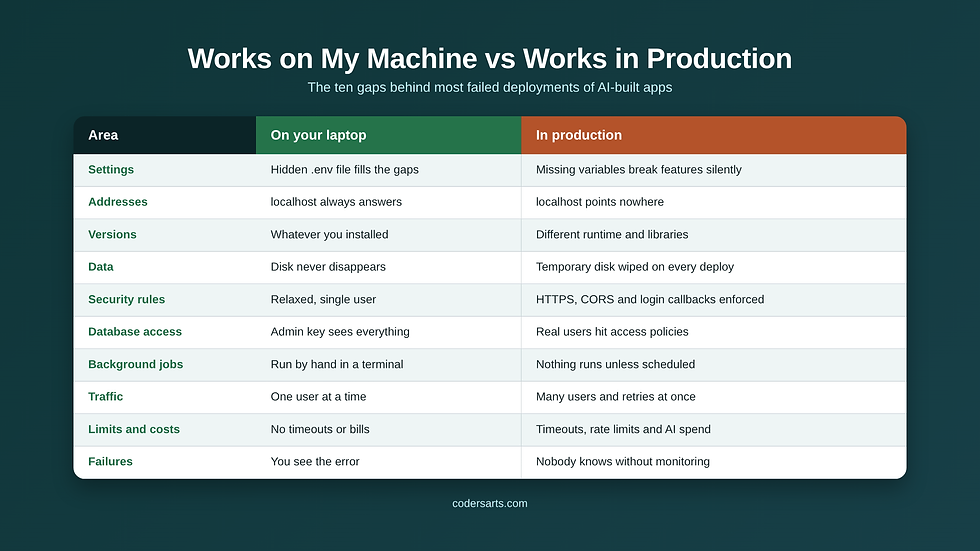
1. Missing or Wrong Environment Variables
Environment variables are settings stored outside the code: database addresses, API keys, the URL of your own site. Locally they often live in a `.env` file that never gets uploaded. In production, if a variable is missing, misspelled or set at the wrong stage, the app may start but fail in strange ways: blank pages, failed logins, or features that silently do nothing.
Typical fix: list every variable the app reads, set each one on the hosting platform, and make the app check for required settings when it starts, so it fails loudly instead of silently.
2. Hardcoded Localhost Addresses
AI-generated code often contains addresses such as `http://localhost:3000`. On your computer that points to your own machine. In production it points nowhere useful, so the front end cannot reach the back end.
Typical fix: move every address into configuration and use the real production domain.
3. Different Versions of Software
Your laptop might run one version of Node.js or Python; the server might run another. Libraries can also install differently if the lockfile, the file that pins exact versions, is missing or ignored.
Typical fix: pin the runtime version, commit the lockfile and install dependencies exactly as locked.
4. Data That Disappears
This is the most painful cause, because it can look like success for a while. Many AI tools choose SQLite, a database stored as a single file, or save uploads to the local disk. On many hosting platforms, especially serverless ones, that disk is temporary. Every deploy or restart wipes it, and your users' data goes with it.
Typical fix: use persistent storage or a hosted database. SQLite can work well on a single server with a persistent disk and proper backups, but not on platforms that reset the file system.
5. Security Rules That Only Bite in Production
Browsers apply stricter rules once your app runs on a real domain with HTTPS. Cross-origin requests (CORS), cookie settings and login callback addresses are frequent culprits. Login flows built with providers such as Supabase or OAuth services often break because the production redirect address was never added.
Typical fix: allow exactly the production domains and callback addresses, and test login end to end on the live site.
6. Database Access Rules
Apps built with Lovable or Bolt often use Supabase, which protects data with row-level security policies. Locally, or with an admin key, everything is visible. In production, with real user accounts, queries return nothing because the policies were never written, or worse, return everything because they were switched off.
Typical fix: review every table's access policies with real test users before launch.
7. Development Mode vs Production Builds
Many frameworks behave differently in development. Production builds are stricter, optimise code and sometimes expose errors that development mode hid. Some features, such as environment variables used in the browser, must be available at build time rather than at run time.
Typical fix: run a production build locally before deploying, and fix every warning it raises.
8. Background Jobs and Schedules That Never Start
Locally you might run a scheduled task by hand or keep a terminal window open. In production, nothing runs unless it is set up as a separate worker or scheduled job. Timezones add another trap: a job scheduled for 9 am may run at 9 am on the server's clock, not yours or your customers'.
Typical fix: run workers as supervised processes, schedule jobs explicitly, and store and use the correct timezone for each customer or site.
9. Real Traffic and Concurrency
One user clicking around is very different from many users at once. Two people buying the last item, a job retrying while the first attempt is still running, or a slow AI call holding up every other request can all cause failures that never appear locally.
Typical fix: move slow work into background jobs, add sensible timeouts, and protect shared data with transactions or locks.
10. Limits, Timeouts and Costs
Hosting platforms enforce memory limits and request timeouts. AI providers enforce rate limits. An AI feature that takes 40 seconds locally may be cut off after 30 in production. A retry loop that is harmless in testing can run up a large AI bill overnight.
Typical fix: set timeouts deliberately, add rate limits and spending budgets, and stop retries after a fixed number of attempts.
Tool-Specific Gotchas
Tool | Common production issue |
Lovable | Supabase row-level security policies missing or too open; exposed keys in front-end code |
Bolt | Build configuration and environment variables that only exist in the preview environment |
Replit | Data stored in the workspace that does not move with the app; secrets that live only in Replit |
Cursor | Version and dependency differences between your machine and the server |
Claude Code | Background jobs, scheduled tasks and local databases that need persistent hosting and supervision |
v0 | Interfaces that look complete but need a real backend, authentication and deployment setup |
These are patterns, not guarantees; your app may have none of them or a combination.
A Step-by-Step Way to Find the Problem
When something breaks after deployment, guessing wastes time. Work through it methodically:
Find the stage that fails. Is it the build, the app starting up, a specific request, or something that only happens under load? Each stage has different causes.
Read the logs for that stage. Hosting platforms record build and runtime logs. The first error is usually the real one; later errors are often side effects.
Compare environments. List the differences between local and production: variables, versions, addresses, database and storage.
Change one thing at a time. Fix the most likely cause, redeploy and test the exact flow that failed.
Test like a real user. Use a new account, a different browser and the live domain, not your admin login.
Write down what you found. The next deployment will be faster, and anyone helping you later will thank you.
The Production Readiness Checklist
Before you invite real users, check that:
Every environment variable is set in production and checked at startup
No passwords or API keys appear in the code or the browser
The database and uploaded files live on persistent storage
Backups run automatically and at least one restore has been tested
Users can only see and change their own data
Login works on the live domain with a brand-new account
Background jobs and schedules run on their own, in the right timezone
Services restart automatically if they crash
You receive an alert when the app goes down or a job fails
AI and other paid services have spending limits and retry caps
Someone is responsible for security updates every month
If you cannot tick every item, that is normal for a first launch. The point is to know where the gaps are before your customers find them.
How to Prevent the Next Deployment Failure
Fixing today's problem is only half the job. These habits stop the same class of failure from returning:
Use a staging environment that mirrors production, so every change is tested somewhere realistic before customers see it.
Deploy small changes often rather than large batches, so when something breaks you know exactly what caused it.
Keep a rollback plan. Know how to return to the previous working version in minutes, and practise it once.
Turn on error tracking and structured logs, so failures arrive with enough detail to diagnose without guesswork.
Automate checks before deployment, such as running tests and a production build, so obvious mistakes never reach the live site.
Why This Matters More for AI-Built Apps
AI coding tools have made it possible to build in days what once took months. That is genuinely remarkable. But building and operating are different skills. An app that works in a preview is a prototype. An app that survives restarts, real users, failed payments, provider outages and 3 am errors is a product.
Many teams find a safe middle path useful: launch first in a draft-only pilot, where the app runs on real infrastructure but publishing, live emails and paid AI calls stay switched off until you approve them. You learn how the app behaves in production without any risk to customers. Our guide to the draft-only pilot explains how that works.
When to Get Help
You can solve many of these problems yourself with patience and good logs. It is worth bringing in an experienced team when:
The app handles payments, personal data or customer accounts
You have lost data, or are worried you might
Fixes keep breaking other things
You do not have time to learn operations as well as run a business
You need someone accountable when things go wrong at night
Codersarts takes AI-built apps to production without rewriting them. We deploy your app as it is on a managed server, connect monitoring and encrypted backups, test a full restore and give you a plain-language report of anything that needs fixing. See AI-built app to production and our Go-Live package for details.
Frequently Asked Questions
Why does my app work locally but not in production?
Usually because production lacks something your computer provides automatically, such as environment variables, the right software versions, persistent storage or permissive security settings.
Why does my app lose data after every deploy?
Your data is probably stored on a temporary disk, often as a SQLite file or local uploads. Move it to persistent storage or a hosted database.
Why does login work locally but fail on my live site?
The production domain or callback address is usually missing from your login provider's settings, or cookie and CORS rules block it on HTTPS.
Is AI-generated code safe to deploy?
It can be, once common gaps such as exposed keys, weak access rules and missing backups are fixed. A code review before launch shows exactly where your app stands.
Can I keep using SQLite in production?
On a single server with a persistent disk and continuous backups, often yes. On serverless platforms or multiple servers, use a hosted database.
How do I know my app is ready for real users?
Work through a production readiness checklist: configuration, secrets, storage, backups, access control, monitoring, restarts and spending limits.
The Bottom Line
"It works on my machine" is not a sign that your app is broken. It is a sign that it has not yet been prepared for the world outside your laptop. Find the failing stage, compare environments, fix one cause at a time, and use a production checklist before you launch.
If you would rather hand that work to a team that does it every week, talk to us about taking your app live.


Comments